




Regardless of how popular a specific software appliance is, particular versions of it are inevitably phased out over time, paving the way for new ones. MySQL, the DB-Engines DBMS of the Year in 2025, is perfect proof of this.
MySQL 8.0 was officially released on April 19, 2018, and now its official End-Of-Life (EOL) is set for April 2026, 8 years later. Oracle will stop providing security patches, bug fixes and general support for the RDBMS after this date. But what if you want to continue using it – and should you? Let’s find out.
What does ‘end-of-life’ for MySQL 8.0 really mean?
If you’re reading this at the time of publication (February 2026), April will soon be here, so now is the time to think about the options available to you when it comes to MySQL 8.0.
So, what do you do? First, think about what can happen once the date arrives. Generally, when a product reaches its end of life, it’s no longer officially supported. What exactly happens next is up to the vendor, which in this case is MySQL (not MySQL in general: a specific version of MySQL – 8.0.)
In this case, it’s simple: no further updates will be made. Users will be strongly encouraged to upgrade or migrate to MariaDB or Percona Server if they want new features or security improvements.
It’s worth noting that EOL is the last step of the MySQL 8.0 support phase, which goes as follows:
- Active support: new features, bug fixes, and security improvements are released.
- General support: no new features are introduced, but security improvements are sometimes released.
- End of life: the specific version of the software is discontinued, so no further updates are made to it. You can continue to use the version – nobody’s forcing you to move or upgrade – but it’s recommended to do so. Continuing to use a discontinued version comes at your own peril.
Now’s the time to make a decision – especially if you haven’t yet upgraded.
Using MySQL 8.0 post end-of-life: what are the options?
If you want to stay with MySQL 8.0 after its April 2026 EOL, you do have the assurance of Oracle’s 5 years of Premier Support for most major versions of the software, as well as 5 years of Extended Support.
Exact dates for these may vary, but here’s what ChatGPT says:
- Premier Support should be ongoing from 2018 (depending on when you’re reading this, it may or may have not ended.)
- Extended Support typically lasts 5 years after the date Premier Support comes to life. Learn more on Oracle’s website.
So, you can continue using MySQL 8.0 knowing that it should be supported by Premier or Extended support for a couple more years, but you could also upgrade to a newer version of the system. The latter may be the most straightforward and logical option for many; at the time of writing, you can choose to stay with MySQL 8 and try version 8.4, or even give version 9 a go.
MySQL schema comparison for faster, safer deployments
What are some suitable alternatives to MySQL?
You could consider alternatives to MySQL, especially if your requirements for the software have changed – now’s the time to try something different! After all, you don’t have to go far to find database management systems doing almost exactly the same thing as MySQL and providing almost the same UX.
For example, if you think you could do with BASE instead of ACID, why not try MongoDB – and learn all about it on Simple Talk? There’s also MariaDB and Percona Server.
You could also try Cassandra and, if you’ve used SQL clients, why not try ClickHouse? Fun fact – former SQL client Arctype is now part of ClickHouse under ClickHouse Cloud.
Aside from considering RDBMS alternatives, you may be able to leverage managed database services to assist you as well…
What are managed database services?
If you don’t want to upgrade MySQL or the process itself seems daunting (it’s not that hard – believe me), consider using managed database services such as Amazon RDS, Google Cloud SQL or Azure Database for MySQL. This approach would enable you to defer all of the heavy lifting of maintenance, upgrades, patches and backups to the services themselves, allowing you to focus on the work you need to do.
How to prepare for – and prevent – disaster with MySQL 8.0
If you’ve assessed your options and still want to stick with MySQL 8.0, I’m not saying that not updating your MySQL instances will always result in disaster, but there are steps you can take to continue using it safely. Let’s firstly look at how exactly one uses MySQL 8.0:
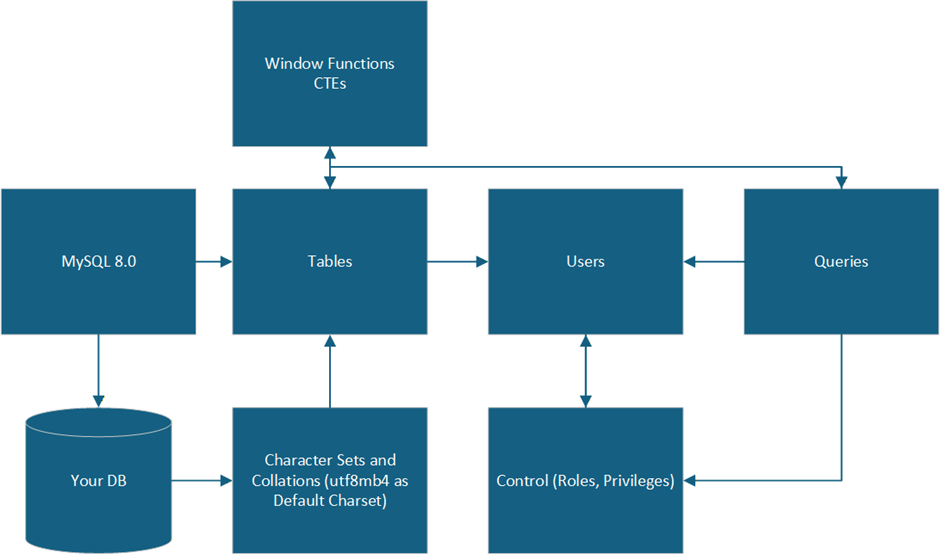
Put simply, many MySQL 8.0 users will use features not present in other versions of the software or its counterparts. These include (but are not limited to) utf8mb4 as a default character set, roles (collections of privileges), window functions, and Common Table Expressions (CTEs).
Future-proof database monitoring with Redgate Monitor
If you stay with MySQL 8.0, it’s crucial to understand what you can and cannot do. Understand that:
- The SQL query cache is no longer available due to performance issues (overhead on multi-core systems)
- .frm files were replaced by a data dictionary in InnoDB
- You can use descending indexes to store data in descending order
- You should make use of generated columns
- Don’t forget about improved security features – for example,
caching_sha2_passwordhas replacedmysql_native_password
Final thoughts and next steps
I’ve outlined the options available to you, so now it’s time to make a decision. And remember: if you still want to continue using MySQL 8.0, you can continue to use it safely after April 2026 by implementing best practices.
Peruse strong passwords, use SSL / TLS, limit privileges using GRANT, implement proactive monitoring and alerts, leverage backups, and have a disaster recovery plan in place. Also, don’t forget to check whether you’re susceptible to identity theft attacks by perusing data breach search engines – and make sure to follow all the other advice and guidance I’ve provided here.
Want more MySQL content? Click here for Simple Talk’s full archive.
FAQs: How to safely use MySQL 8.0 post end-of-life (and alternatives to consider)
1. What does MySQL 8.0 End of Life mean?
After April 2026, Oracle will no longer provide security updates, bug fixes, or official support for MySQL 8.0. Running it post-EOL increases your exposure to security and compliance risks.
2. Is it safe to keep using MySQL 8.0 after EOL?
You can, but understand that, without patches, newly discovered vulnerabilities won’t be fixed. To continue using MySQL 8.0 safely, you’ll need stronger compensating controls (network isolation, TLS, strict privileges, monitoring, backups, and a tested disaster recovery plan).
3. What are the best upgrade options after MySQL 8.0 EOL?
The safest path is upgrading to a supported MySQL release like MySQL 8.4 or MySQL 9 to stay current with security updates and features.
4. Can I migrate away from MySQL instead of upgrading?
Yes. Popular drop-in or near-drop-in alternatives include MariaDB and Percona. If your architecture allows BASE-style systems, you might also consider MongoDB, Apache Cassandra, or analytics-focused SQL engines like ClickHouse.
5. Are managed database services a good alternative?
Yes. Managed services like Amazon RDS, Google Cloud SQL, and Azure Database for MySQL handle patching, backups, upgrades, and much of the operational burden for you.
6. What should I do right now to prepare for MySQL 8.0 EOL?
Audit your instances, test upgrades or migrations in staging, validate application compatibility (CTEs, window functions, auth plugins), implement monitoring and backups, and document a rollback + disaster recovery plan before April 2026.
This document contains proprietary information and is protected by copyright law.
Copyright © 2026 Red Gate Software Limited. All rights reserved



Load comments